Here we are at the last and final part of this post on Modular Programming! In this part, we will be looking covering the below two topics:
- API’s
- Data Areas
API
API’s are Commands or Programs built into the the Operating system that allow you to access lower level machine functions or system data not otherwise available within a high level programming language.
We will look at examples of two API’s to understand how to make use of them.
First one is QUSCMDLN which can be used to display the iSeries command line when required.
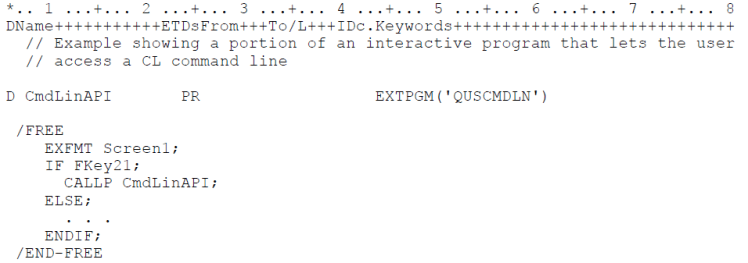
An example of the usage of this API is shown above. The logic has been designed in such a way that if the user presses function key, F21, when Screen1 is being displayed, a pop up window showing the iSeries command line appears.
As can be seen, a prototype of the API is included at the beginning of the program. It has to be noted that there are no parameters passed to this program.
The second example of an API usage is shown below. The API being considered here is QCMDEXC. This can be used if a CL command needs to be executed from within an RPG.
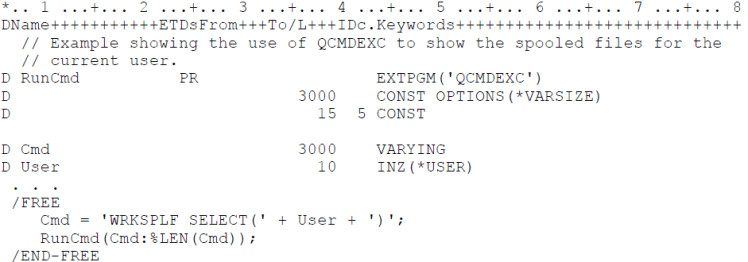
The two parameters being passed to this API are the command to be executed and the length of the command itself.
For example in the above code, all the spool files of the current user will be displayed.
Data Area
Data areas are OS/400 objects that represent storage locations used to share data between programs/procedures or within or between jobs.
The system automatically creates a Local Data Area (LDA) for each job in the system. Each LDA is 1024 bytes long filled with blanks initially. When you submit a job using the SBMJOB CL command, the value of your LDA gets copied into the LDA of the submitted job.
Programmers use data areas to store small quantities of data frequently used by several programs or by the same program when it runs multiple times.
When it comes to storage and retrieval of Data Area contents, the method that was used in the earlier version of RPG as well as a newer technique need to be considered.
First well have a look at the older method where the *DTAARA operation is used. The code below shows an example of the older technique.
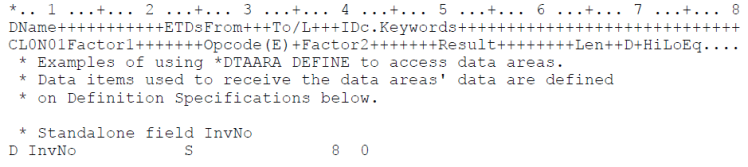
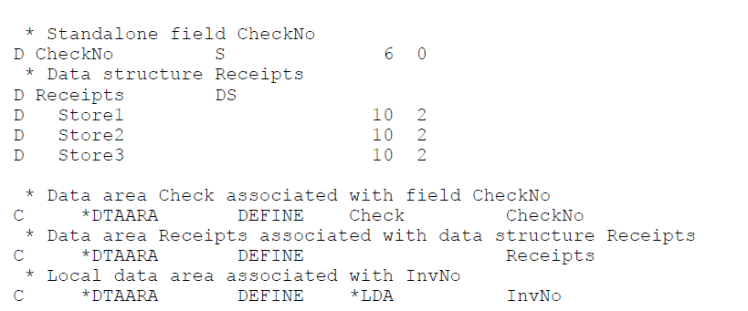
In the *DTAARA Define operation, Factor 1 contains the name of the Data Area and Factor 2 contains the name of the variable that should receive the contents of the data area.
In the above example, Check is the name of the Data area and Checkno is the name of the variable that will receive the contents. if the local data area needs to be used, *LDA must be mentioned in factor 2.
Operation OUT writes data back into a data area specified in Factor 2. An optional *LOCK can be included in factor 1 if the data area needs to remain locked after it is updated.
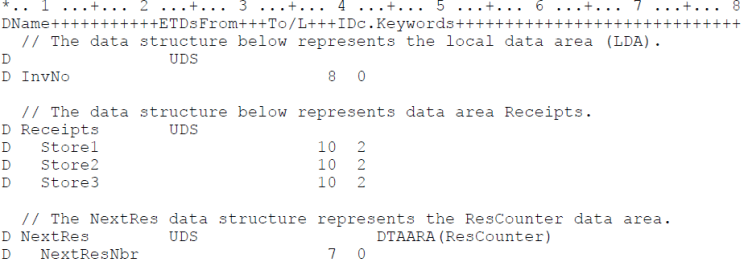
A newer technique to access contents of a Data Area is through a data area data structure. A ‘U’ in the type field of a data structure definition identifies it as a data area data structure.
If no name is specified in the data area data structure definition, then it assumes that the LDA is being accessed by default. If another data area needs to be accessed, the name of the data structure needs to match the name of the data area. If a different name needs to be given to the data structure, the DTAARA keyword can be used. The three methods are shown in the code snippet below.
 The Fortress Platform :)