We are going to start with a simple example of how to write an Embedded SQL RPG program in Free format with the aim of understanding the syntax. The code below selects the name of the employee (EMPNAME) from EMPPF database file whose empno is 10 and displays it on the screen.
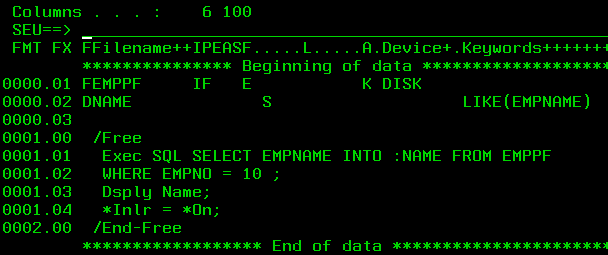
The variable NAME is declared to have the same attributes as that of the field EMPNAME in EMPPF Database file.
NAME is called as a host variable.
Google defines a host variable as below:
"A host variable is a field in your program that is specified in an SQL statement,
usually as the source or target for the value of a column.
The host variable and column must have compatible data types"
The above example is too simple. As mentioned earlier, written simply for the sake of understanding the syntax.
Now, we consider a more realistic piece of code which selects data into multiple host variables. The below Program selects all the fields in the EMPPF file of the employee whose EMPNO is 10 into host variables which are part of the externally described data structure EMPREC.

This technique can only be used if the SELECT statement returns one and only one record. If more than one record matches the selection criteria, then the statement will fail.
A very useful technique shown below is the use of an externally defined data structure.

There might be cases where a database file is gonna contain hundreds of fields. In such instances, instead of declaring one host variable to correspond to each of the fields, a data structure as above can be defined specifying the file name as the EXTNAME to refer to.
Now all the field names in the EMPPF file can be used as host variables in the program.
Now, we can write a statement such as:
SELECT * INTO :EMPREC FROM EMPPF WHERE EMPNO = 100
The individual fields can now be used like any other variables in a program. Every RPG IV program that includes SQL statements will have additional variables added to it by the SQL Pre-compiler.
The definition of an SQL Pre-compiler is given below.
SQL precompiler - Computer Definition. Software that turns SQL commands written
within a source program into the appropriate function calls for the database
management system (DBMS) being used.
The two most important of these variables are SQLCOD (SQL Code) and SQLSTT (SQL State). Both reflect the status of a previously executed SQL statement.
If the last executed SQL statement was successful, SQLCOD value would be set to ‘0’. A positive value in case of a warning and a negative value in case of an error.
A sample program which checks the SQLCOD value after execution of an SQL statement is shown below:
D EmpDS   E DS  Extname(EMPPF)
 /Free
   Exec SQL SELECT * INTO :EMPDS FROM EMPPF WHERE EMPNO = 10;
   If SQLCOD = 100;
     Dsply 'Record Not found';
     Exsr RecordNotFound;
   ElseIf SQLCOD < *Zero;
     Dsply 'Error';
     Exsr ErrorRoutine;
   EndIf ;
   *Inlr = *On;
   Return;
/End-Free
Some of the SQLCOD values are given below for the sake of reference.
- 00 Unqualified Successful Completion
- 01 Warning
- 02 No Data
- 03 SQL Statement Not Yet Complete
- 07 Dynamic SQL Error
- 08 Connection Exception
- 09 Triggered Action Exception
- 0A Feature Not Supported
- 09 Invalid Token
- 20 Case Not Found for CASE Statement
- 21 Cardinality Violation
- 22 Data Exception
- 23 Constraint Violation
- 24 Invalid Cursor State
- 25 Invalid Transaction State
- 26 Invalid SQL Statement Identifier
- 27 Triggered Data Change Violation
- 28 Invalid Authorization Specification
- 2B Dependent Privilege Descriptors Still Exist
- 2C Invalid Character Set Name
- 2D Invalid Transaction Termination
- 2E Invalid Connection Name
- 2F SQL Function Exception
- 33 Invalid SQL Descriptor Name
- 34 Invalid Cursor Name
- 35 Invalid Condition Number
- 38 External Function Exception
- 39 External Function Call Exception
- 3C Ambiguous Cursor Name
- 3D Invalid Catalog Name
- 3F Invalid Collection (Schema) Name
- 40 Transaction Rollback
- 42 Syntax Error and Access Rule Violation
- 44 WITH CHECK OPTION Violation
- 51 Invalid Application State
- 53 Invalid Operand or Inconsistent Specification
- 54 SQL or Product Limit Exceeded
- 55 Object Not in Prerequisite State
- 56 Miscellaneous SQL or Product Error
- 57 Resource Not Available or Operator Intervention
- 58 System Error
Other SQL Statements like insert and update can be embedded in RPG programs and host variables can be used there as well.
An example is shown below where host variables have bee used to update fields of database files.

Another interesting technique is to use an externally defined data structure to insert data records into a database file as shown below.
 //The below line defines an externally described Data structure which refers the
// record format of the EMPPF Database file

D EMPREC   E  DS                   EXTNAME(EMPPF)

 /Free

  //Below lines set the variables to appropriate values of the new record to be
  //inserted.

   EmpName = 'Thejwal';
   EmpNum = 210;
   Address = 'Bangalore'
   Email = 'thejwal.pavithran@polaris.com'

//Insert new record using the Data structure. No need to explicitly mention Field
// names
   Exec SQL INSERT INTO EMPPF VALUES(:EMPREC);
   *Inlr = *On;
   Return;
 /End-Free
An alternate technique is to specify the field values explicitly in the SQL:
INSERT INTO EMPPF (EMPNAME, EMPNUM, ADDRESS, EMAIL) VALUES(‘Thejwal’,210,’Bangalore’,’thejwal.pavithran@polaris.com’)
Obviously, the technique where the data structure is used is much easier to use.
In the next part of this post, we will look at the concept of Dynamic Embedded SQL.
 The Fortress Platform :)