In this post, we look at a very useful concept – programming message subfiles!
Message subfiles are special subfiles designed to hold messages. Message subfiles allow users to view second level help text associated with a message without any programming effort. Message subfiles make it possible to set up a consistent group of information, warning or error messages related to an application and display those messages to a user.
The steps required to set up a message file are as below:
- Setup a message file (*MSGF) containing the messages you want to setup in your application. You can use existing message files or create your own using CRTMSGF command. System message files such as QCPFMSG should not be modified.
- Message files are created using the CRTMSGF command and new messages can be added using the ADDMSGD command or through the WRKMSGF command.
- Define a message subfile in your display file.
- Code your application to send messages to the program message queue. In RPG, this is achieved through the QMHSNDPM and in CL, it is achieved through SNDPGMMSG.
- After displaying the message file, you can remove then using QMHRMVPM API or using the RCVMSG command in CL.
Two important points that you must be aware of are:
- Every Call Stack entry – which can be an OPM program or an ILE Module, has a corresponding message queue with the same name.
- The program status data structure in an RPG program, has fields that contain the program and procedure name.
As shown below, the program data structure contains the name of the procedure which makes it easier to retrieve its name.

The main difference between a regular subfile and a message subfile is that, in a regular subfile, the loading and clearing of records need to be done explicitly through the Program logic. But in a message subfile, this is done by sending and removing messages in the message queue.
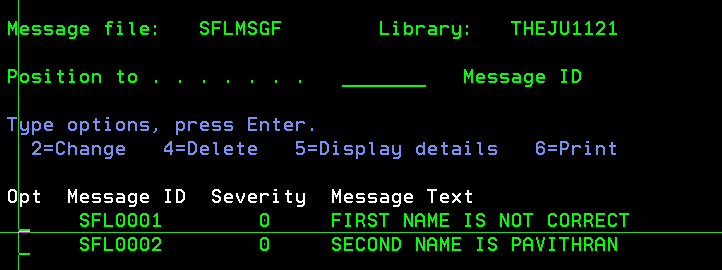
The first step is to create a message subfile using the CRTMSGF command with appropriate message IDs as shown below:
In the message subfile record format, the below keywords are required:
- SFLMSGRCD – Sets the starting line on the display for the message subfile.
- SFLMSGKEY – Controls the message key of the first message to be displayed in the message subfile. Every message as it arrives in the message queue, gets assigned a unique key. Setting the message key allows to control which messages are to be displayed.
- SFLPGMQ – Determines the program message queue from which messages are pulled.
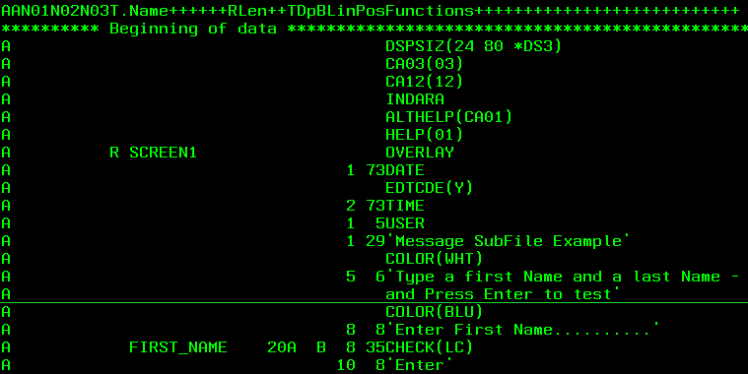
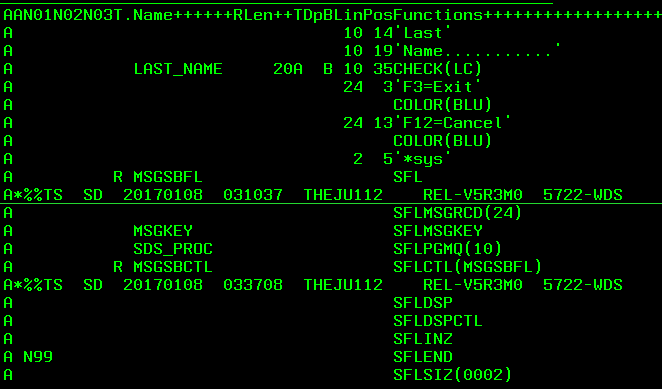

The code above shows the DDS for a display file with three record formats:
- Screen 1: Main screen for user data entry.
- MSGSBFL: Message subfile record format.
- MSGSBCTL: Message subfile control format.
Don’t forget the OVERLAY keyword for the main screen record format (SCREEN1 here). Otherwise your messages wont be displayed by the RPG program below and you’ll be banging your head like I did:
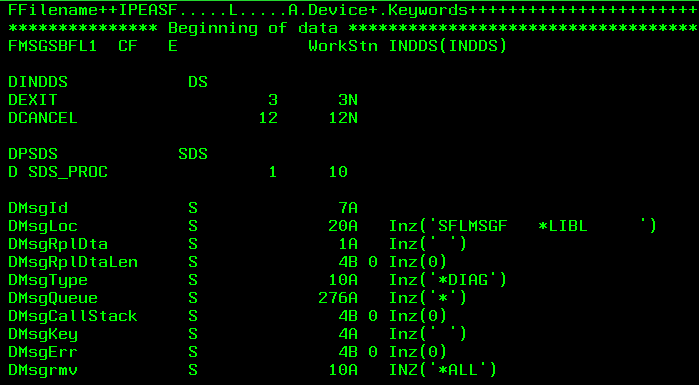
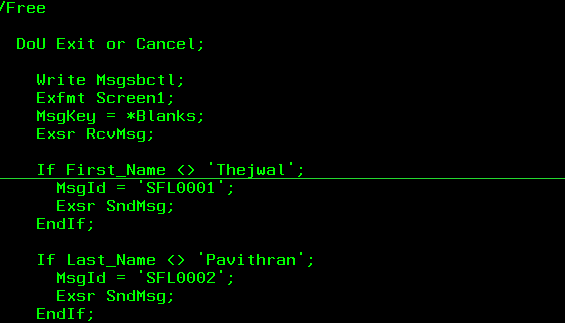
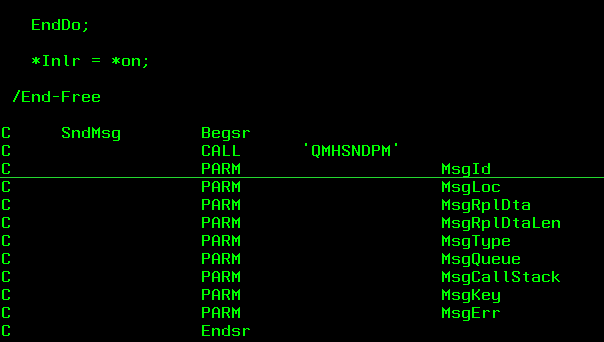
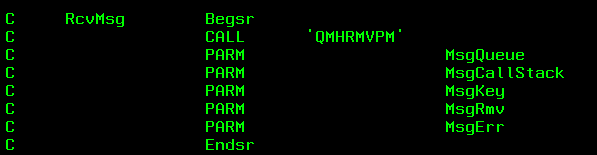
MHSNDPM and MHRMVPM are APIs used to send messages to Program queues. Please refer to the IBM website for detailed documentation on this.
Another important technique is the use of a CL Program to display and clear the messages instead of the APIs.
This is much simpler to understand and use. The CL program to be used can be written as below:
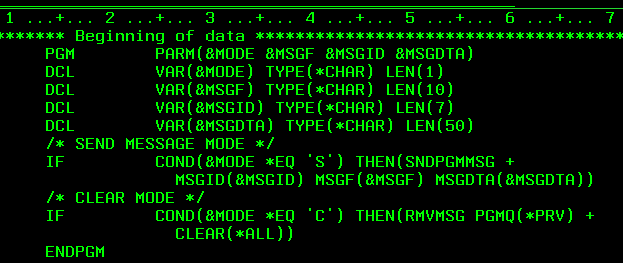
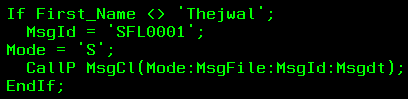
This can be prototyped in the RPG and called as required as below.
Prototype:

Call Wherever required:
 The Fortress Platform :)