In this post, we are going to see a slightly advanced and very useful concept related to Stored Procedures…. returning Output from Stored procedures. This can be achieved in two ways:
1) Through Output parameters
2) Through Result Sets
Returning data from Stored procedures through output parameters is fairly a simple concept and the below code snippets should be enough to completely explain this concept.
Below is a simple RPG program which calls an SQL Stored Procedure by the name Sqlsp and three parameters, NUM1, NUM2 and NUM3 are passed to the SP.
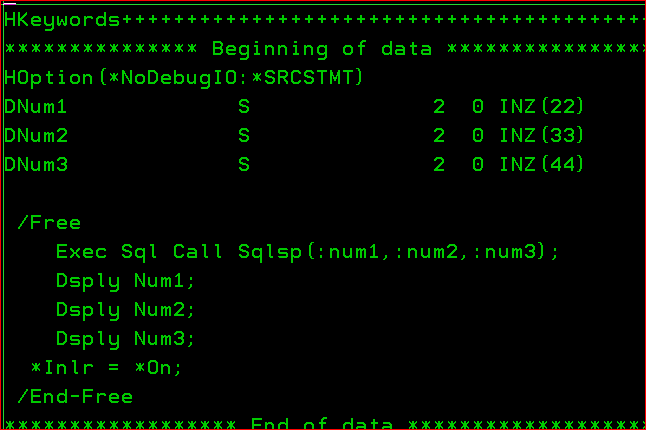
Remember that an SP has to be invoked using the Call command written as part of an Exec Sql statement.
All this SP does is change the value of the Parameters passed to it.
Below is the code used to create the Stored Procedure. The only logic in this SP is to convert the values of the parameters passed to it.
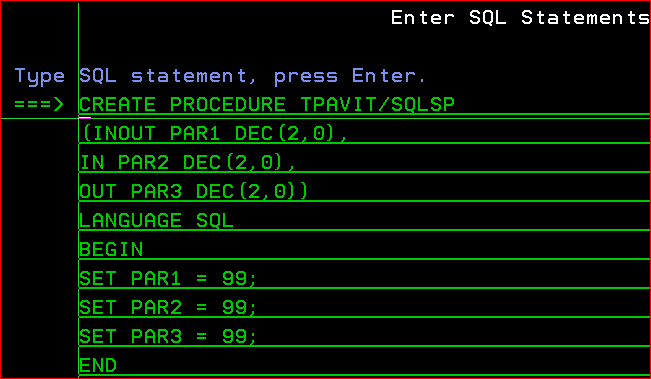
The 3 types of parameters that can be declared in an SP are:
IN : PAR 2 in this case A variable passed in this mode is of read only nature. This is to say, the value cannot be changed and its scope is restricted within the procedure. The procedure receives a value from this argument when the procedure is called.
OUT : PAR 3 in this case In this mode, a variable is write only and can be passed back to the calling program. It cannot be read inside the procedure and needs to be assigned a value.
INOUT : PAR 1 in this case This procedure has features of both IN and OUT mode. The procedure can also read the variables value and can also change it to pass it to the calling function.
The RPG program would display an output as below:
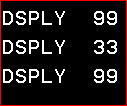
As can be seen, Num1 and Num3 parameter values have been successfully changed to 99 by the SP. But Num2 remains unchanged. This is due to the fact that it has been declared of type ‘IN’ which essentially makes it read-only. However the other 2 parameters are OUT or INOUT which allows their values to be changed.
This is a very simple example .. too simple that its almost useless.
A more useful SP would be something like this:
 The Fortress Platform :)